This is the third blog in the series where we will be checking in with the best practices to deploy Swirl.
Swirl's Azure-hosted Architecture and Security Commitment
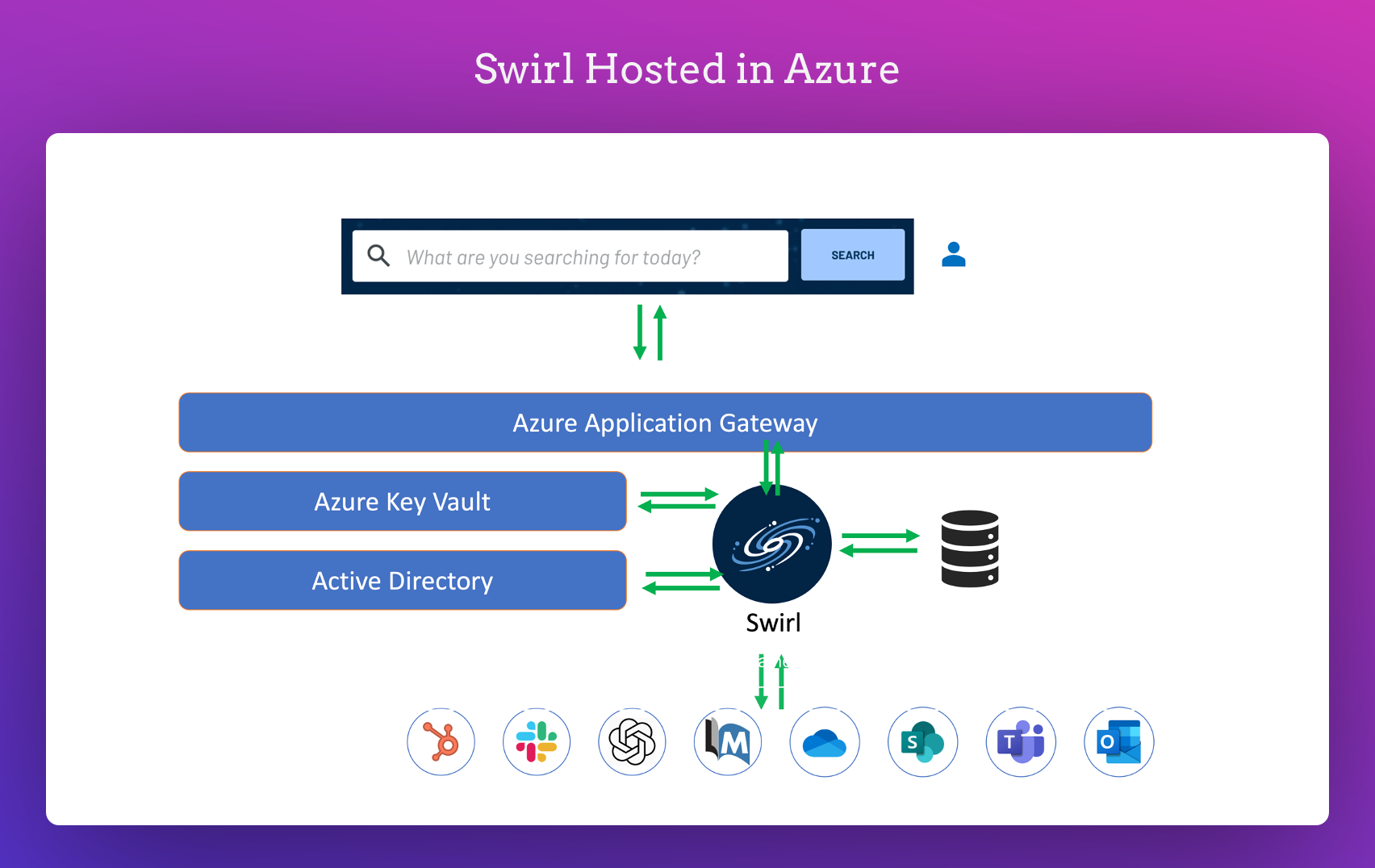
The diagram above showcases the standard layout for Swirl when hosted in Azure. All offerings hosted by Swirl strictly adhere to the following:
- The practices are recommended in the subsequent section.
- Swirl's design highlights its commitment to security.
- Comprehensive measures to safeguard user data.
Delving Deeper into Swirl's Security Framework
As we progress through this article, we aim to shed light on:
- The complexities of Swirl's security framework.
- Its methods for securely storing credentials.
- Protocols established for user provisioning.
As we dive deep into the deployment best practices, I suggest you check the previous two articles in the series.
Delving Deeper into Swirl's Security Framework
1. Basic Configuration for Production Use:
- Ensure you're using HTTPS for secure communication.
- Redirect all HTTP traffic to HTTPS for added security.
- Choose PostgreSQL as your database.
- Secure your connection to the API, Web UI (including Galaxy), and database using TLS v1.3 certificates.
2. Enhancing Performance with a Reverse Proxy:
Swirl suggests using a reverse proxy. Why? It:
- Handles cryptographic tasks, reducing the load on your application server.
- It can be set up to distribute traffic among multiple application servers. This boosts your system's capacity and ensures it remains running even if one server faces issues.
3. Optional Configuration for Advanced Users:
If you're looking to customise further, you can configure the reverse proxy to redirect incoming traffic from the standard port 443 to Swirl's internal application server on port 8000.
Guide to Logging for Compliance & KYC with Swirl
1. Why Log User Activity?
- Maintaining a record of user actions is essential for compliance and Know Your Customer (KYC) processes.
2. How to Log User Activity?
You have two main options:
Customise Your Logging Format:
- Do you want a specific format for your logs? No problem!
- Reach out to Swirl support for help in setting this up.
Analyse the Swirl Database Directly:
- This is a great option unless you're using the Search Expiration Service.
- Swirl's top recommendation for this is Metabase, and it's included with all Swirl-hosted installations.
- However, if you have a favourite tool, go for it! Just ensure its compatible with PostgreSQL. This means most Business Intelligence, Reporting, or Analytic tools should work just fine.
Thank you for exploring Swirl's Security Overview with us!
Now, after this guide, you can:
- Dive deeper: Visit our GitHub repository.
- Check the Swirl docs to get started.
- Questions? We're here to help every step of the way. Join our Slack and drop in a message or email us at hello@swirl.today.